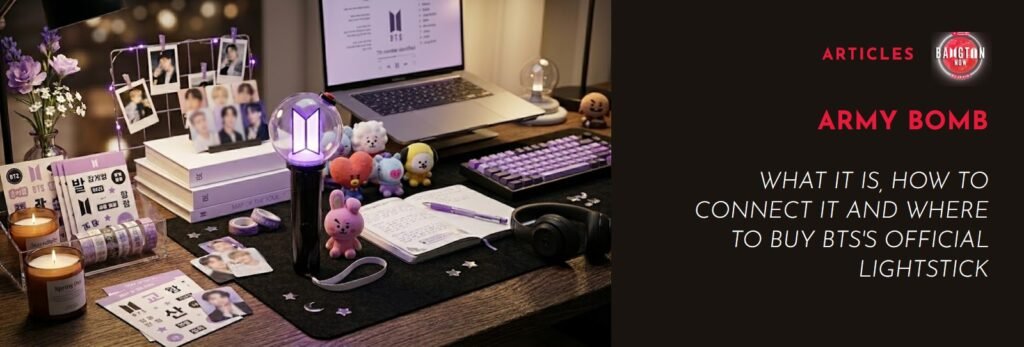
If you, like me, have always dreamed of having your own ARMY BOMB, this is the right place to learn how to get one — especially now, during the ARIRANG Tour, when every fancam from the shows makes us want one even more. Shall we?
Here you’ll find everything about the ARMY BOMB, BTS’s official lightstick: what it is, every version released so far, how to tell if yours is authentic, how to connect it to the app and where to buy it safely.
What is the ARMY BOMB?
The ARMY BOMB is BTS’s official lightstick — the glowing stick fans hold up during concerts. But it’s much more than a cute concert accessory: it’s a symbol of the fandom, something we want to have even if we haven’t been to a BTS show (yet).
The name is an affectionate pun: it combines ARMY (BTS’s fandom) with BOMB, which sounds like bong, the Korean word for “stick”. And of course it fits the group’s own name: BTS comes from Bangtan Sonyeondan, “Bulletproof Boy Scouts”, and a “bomb” matches the concept perfectly. Whoever came up with the name knew exactly what they were doing.
Visually, the ARMY BOMB has a translucent globe — representing BTS conquering the world — on top of a black handle. The black and red detail on the globe gives it that “bomb about to go off” look, and it has a charm all its own.
And as if that weren’t enough, every new version is more high-tech, with amazing light and color features.
ARMY BOMB or lightstick: what’s the difference?
Before we go on, let’s clear up a common confusion, especially for new ARMYs: what’s the difference between “ARMY BOMB” and “lightstick”?
ARMY BOMB is the name of BTS’s own product, while lightstick is the general name for any of the glowing sticks that are so common in K-pop fandoms. So if you search Google for “BTS lightstick”, the ARMY BOMB is what you’ll find.
Why is the ARMY BOMB different from other lightsticks?
The most impressive feature of the ARMY BOMB is concert syncing — and I know you know what I’m talking about… At a BTS concert, the lightstick connects to a central system run by the production team, which controls thousands of ARMY BOMBs in the crowd at the same time. Depending on the song, the moment of the show and the section of the stadium you’re in, your lightstick changes color automatically, without you doing anything.
Since our color is purple, it naturally takes over, and the effect is lovingly called the “Purple Ocean”: fifty thousand (or more) BTS lightsticks shining in choreographed patterns, turning the whole crowd into part of the show. It’s like a work of art made by the fans themselves.
And yes, you can use your ARMY BOMB outside of concerts too — at BTS-themed parties with friends, for example, or just for fun at home. That’s because the ARMY BOMB pairs with videos on the Weverse platform.
Here’s how it works: Weverse has a feature that lets some BTS music videos sync with the ARMY BOMB. Not all of them, but some MVs have this feature enabled, and the ARMY BOMB reacts to the music automatically via Bluetooth.
This feature was originally confirmed for Ver. 3 and the MAP OF THE SOUL Special Edition, and it only works on mobile devices.
You can also use your ARMY BOMB as decoration (or as a little shrine, next to your albums and photocards). Ver. 4 in particular has a “Self Mode” so it can be used as a lamp at home.
Above all, the ARMY BOMB is a symbol of identity in the fandom, and owning one is a huge joy — almost a reward for all those hours of streaming and voting.
The evolution of the ARMY BOMB: every version
Since the first model was released in 2015, BTS’s lightstick has evolved a lot. Each version brought new technology and became an object of desire (and a collectible) on its own.
Before we go through the versions, it’s worth remembering that at BTS’s first concerts and appearances, before there was an official lightstick, ARMYs used a simple yellow electric glowstick, the basic plastic kind. For specific dates, such as the first shows of “The Red Bullet” tour (2014), the production even customized that same kind of glowstick with the group’s and the tour’s name printed on the side.

This item became informally known as the “yellow fanlight”: a simple yellow glowstick with a fixed light, no Bluetooth and no connectivity of any kind.
The tradition of custom lightsticks in K-pop was started by BIGBANG’s G-Dragon, and around the time BTS debuted, groups only got their own lightstick after building a sizable fandom, which took a few years. That’s why BTS used the generic yellow glowstick for quite a while before the first ARMY BOMB arrived in 2015.
Version 1 (2015)
The first ARMY BOMB was announced by Big Hit Entertainment in March 2015, about two years after BTS’s debut. The design already had the signature translucent globe, but no connectivity at all: it was a fully manual lightstick, with no Bluetooth and no app. Today it’s a rare, historic piece for collectors.
Version 2 (2017)
Released in February 2017, Ver. 2 brought the big news of Bluetooth connectivity, allowing the lightstick’s color to be controlled remotely during concerts. It was a huge technological leap and the model that made the Purple Ocean a true visual phenomenon at BTS concerts.
Version 3 (2018)
With teasers revealed in July 2018 and an official release the same month, Ver. 3 arrived together with the official app, letting fans control the lightstick straight from their phones, in both concert and manual mode. It came with the “Love Yourself” World Tour era and left a mark on many ARMYs’ memories.
Teaser 01
Teaser 02
MAP OF THE SOUL Special Edition (2020)
Released in April 2020, this special edition came with improved connectivity and Weverse integration, allowing the lightstick to react to music and content on the platform in real time.
Version 4 (2026)
The newest and current one. ARMY BOMB Ver. 4 was officially announced on Weverse in February 2026, right before the “ARIRANG” world tour. With improved Bluetooth, more LED color options and a new wireless sync system exclusive to the concerts, it’s the most high-tech version so far.
A super cool feature of this version is “Color Shaking” (it changes color when you shake it). There’s also a “Self Mode” that turns the lightstick into a lamp or decoration at home: yes, the ARMY BOMB is now officially bedroom decor too.
Teaser
Important note about older versions: from June 2026, only Ver. 4 has full support for the sync system at the ARIRANG tour concerts. Owners of older versions — Ver. 3 or the Special Edition — could still use them at the Las Vegas shows in May 2026, but from Busan onwards (June 2026), only Ver. 4 connects to the stage system. This sparked a lot of discussion in the fandom, especially among those who bought one during the hiatus and never got to use it at a show.
If you’re buying now, buy Ver. 4. Simple as that.
How to tell if your ARMY BOMB is authentic
This is one of the biggest risks for first-time buyers: the market for fake ARMY BOMBs is huge, especially on international platforms and with sellers without a proven reputation. A fake lightstick may look identical in photos, but it fails at everything that matters — above all, syncing at concerts.
How to check if your ARMY BOMB is authentic:
- HYBE holographic sticker – The box and the product must have HYBE’s official holographic sticker. The hologram changes color depending on the angle. Fakes usually have flat labels or static holograms that don’t change.
- Authentication QR code (Ver. 4 and Special Editions) – Newer versions come with a QR code that can be checked on HYBE’s official website to confirm authenticity. If the QR code was already used before you registered it, that’s a red flag, as buyers who received non-original products on marketplaces have reported.
- Weight and material quality – The official Ver. 4 weighs between 250 g and 280 g. Fakes are usually much lighter (thin, cheap plastic) or noticeably too heavy because of low-quality metal parts. Older versions are made of ABS, PC and silicone: the original has a firm, even finish.
- Complete box and a manual in Korean/English – The original box comes with an instruction manual (in Korean and English), a wrist strap, a little pouch for storage and, depending on the version, specific accessories. If you got just the lightstick in a flimsy bag with no proper box, be suspicious.
- Connection to the official app – A fake ARMY BOMB usually can’t pair with the official app or, when it does, doesn’t sync properly. If your lightstick doesn’t show up in the app or doesn’t respond to commands, it’s a clear sign it isn’t authentic. The real one pairs without any trouble.
- The price – An authentic ARMY BOMB isn’t cheap. Ver. 4 on Weverse Shop costs around US$45–55 (launch prices), before shipping and any import taxes in your country. If someone is selling it for a fraction of that, it’s fake. Guaranteed.
Golden rule: if a deal looks too good to be true, it’s because it isn’t true.
How to connect the ARMY BOMB
Connecting the ARMY BOMB has two different contexts: everyday use with the app, and syncing during concerts. Let’s take them one at a time.
Connecting the ARMY BOMB to the app (manual mode)
BTS’s lightstick supports the official app from Ver. 3 on. Here’s how it works:
- Step 1: Install the official app – Search for “BTS Official Lightstick” on the App Store (iPhone) or Google Play (Android) and install the official app.
- Step 2: Create an account or log in – The app may ask you to log in with your Weverse account or create a specific account. Always use the official channels.
- Step 3: Turn on your phone’s Bluetooth – Before opening the app, turn on Bluetooth in your phone settings.
- Step 4: Turn on the ARMY BOMB – Insert the batteries (most versions use AA batteries) and turn the lightstick on using the button on the base or the side switch, depending on the version.
- Step 5: Pair it in the app – In the app, go to the option to pair the lightstick and follow the on-screen instructions. The app will detect your device via Bluetooth automatically.
- Step 6: Customize – Once connected, you can choose colors, brightness and blinking patterns. Explore as much as you like: it’s one of the most fun parts.
How to connect the ARMY BOMB to Weverse
This is one of the most common searches, and it makes sense: lots of ARMYs want to sync their lightstick with Weverse content, like videos that make the bomb blink to the music.
- Step 1: Open Weverse on your phone – Log in to your account as usual.
- Step 2: Turn on Bluetooth – With your phone’s Bluetooth on, turn on your ARMY BOMB too.
- Step 3: Find the ARMY BOMB icon on Weverse – On Weverse, go to the BTS community and look for the lightstick icon (it usually appears in the top right corner or in the special content tab). It may show up as “ARMY BOMB” or as a lightstick icon, depending on the app version.
- Step 4: Connect the device – Tap the icon and follow the pairing process. Weverse will recognize the lightstick via Bluetooth and sync automatically with compatible content.
- Step 5: Test it with a compatible video – Not all Weverse content syncs with the lightstick: the specific videos that support the feature will make the lightstick react to the music automatically.
Important tip: if the lightstick doesn’t show up on Weverse, check that the app is up to date, that Bluetooth is on and that your ARMY BOMB version is compatible (Ver. 3 or later). Ver. 1 and Ver. 2 don’t support this feature.
How concert sync works (concert mode)
During BTS concerts, the process is different from everyday Bluetooth. What happens at the shows is a connection to a central system exclusive to the production, which controls every BTS lightstick in the venue at the same time. Bluetooth is only used for the initial pairing: the real-time sync during the concert goes far beyond that.
In practice, when you arrive at the show with your ARMY BOMB, the process usually involves registering your seat number in the app so the system knows your exact location in the venue. From there, the production takes care of everything else — including creating those waves of color that look so beautiful from the stage.
Bora Waves: the ARMY hack for using the ARMY BOMB with YouTube videos
If you’ve been in the fandom for a while, you know how creative ARMYs are. Meet Bora Waves, a free web app made by a fan for fans (at bora-waves.com). The project was created and is maintained by an ARMY known as mphisart, who started studying the ARMY BOMB Ver. 4’s Bluetooth on her own and ended up turning the experiment into a whole community.
How it works
Bora Waves lets ARMYs create custom color and light sequences for the ARMY BOMB and play them via Bluetooth — the same idea as a concert light show, but for your bedroom or a fan event. The site doesn’t host music or videos: the sequences only store the light instructions each creator programmed for a song. YouTube plays alongside on your device, and the ARMY BOMB follows the beat.
In the site’s gallery, anyone can browse sequences made by fans around the world, remix existing ones or create their own from scratch in the editor.
Compatibility
The best-supported models are ARMY BOMB Ver. 3, Ver. 4 and the Special Edition. The app uses Web Bluetooth, and the safest browser choices are Chrome and Edge, on desktop and Android. Safari doesn’t work, and on iPhone Chrome doesn’t either, because it uses Safari’s engine under the hood. For iPhone and iPad users, the tip is to download the Bluefy browser, which adds the Web Bluetooth features Safari doesn’t support.
Step by step
- Open bora-waves.com in Chrome or Edge (on a computer or Android), or in Bluefy on iPhone
- Browse the gallery and pick a sequence for a BTS song
- Turn on your ARMY BOMB and your device’s Bluetooth
- Click the Bluetooth icon on the site and pair the lightstick
- Hit play: the lightstick will follow the sequence’s timing while the YouTube video plays on your device
It’s basically a portable Purple Ocean to enjoy at home. 💜
Oh, and since it’s a fan-made hack, the occasional glitch is bound to happen — but that’s okay, right?
How to buy an ARMY BOMB safely
Now that you know what it is, how to spot an authentic one and how to connect it, the last piece of the puzzle is: where to buy it?
Weverse Shop (the safest option)
Weverse Shop is HYBE’s official store and the most reliable source for any official BTS product, including the ARMY BOMB. The downside is that it can sell out quickly after launches, and international orders involve shipping, possible customs fees and delivery times that can vary a lot depending on your country.
The basic flow is: create a Weverse Shop account, search for “BTS Official Light Stick Ver.4”, check availability for your country, complete payment and shipping, and download the official app when the product arrives.
Authorized K-pop retailers in your country
In many countries there are K-pop stores that import official products directly from Weverse Shop or from authorized distributors. Some already include international shipping and taxes in the final price, which makes life much easier if you don’t want to deal with customs. Whatever store you choose, check its reputation, reviews from other ARMYs and return policy before buying.
Marketplaces (Amazon, eBay and others)
This is where the biggest risk is. Marketplaces have products from many different sellers, and originals mixed with fakes are common. If you decide to buy on these platforms, check:
- The seller’s reputation (reviews, time on the platform, comments)
- Whether the seller clearly states it’s an original product imported from Weverse Shop
- Whether there are real photos of the product, not just promotional images
- Whether there’s a return policy in case the product isn’t original
How much does an authentic ARMY BOMB cost?
For a reference of current prices:
- Weverse Shop (base price): around US$45–55 for Ver. 4.
- Local retailers: usually more than the base price, since they include international shipping and import taxes — how much more depends on your country and the store.
- Special Editions and older versions (resale market): prices vary a lot, especially for sealed or rare pieces.
If you find something far below these prices, remember what we said before: be suspicious.
Quick guide so you don’t get it wrong
What is the ARMY BOMB?
The ARMY BOMB is BTS’s official lightstick, the glowing item fans use at the group’s concerts. The name combines ARMY (the fandom’s name) with BOMB (a nod to the Korean bong, meaning “stick”). More than an accessory, it’s high-tech: it connects via Bluetooth to the official app and, at concerts, syncs with a central system that coordinates the color and light pattern of thousands of lightsticks at once, creating choreographed visual effects in the crowd.
How can I tell if an ARMY BOMB is authentic?
The main signs of authenticity are: a HYBE holographic sticker that changes color with the angle; an authentication QR code that must be unused; weight and finish consistent with the official product (250–280 g for Ver. 4); a complete box with manual and accessories; and the ability to pair properly with the official app. Price is also a clue: authentic ARMY BOMBs aren’t cheap, and offers far below market value are almost always fakes.
Where can I buy an ARMY BOMB?
The safest way is Weverse Shop, HYBE’s official store. You can also buy from K-pop retailers in your country that import official products and include shipping and taxes in the price. On marketplaces like Amazon and eBay the risk of fakes is higher: research the seller’s reputation before buying.
How do I connect the ARMY BOMB to Weverse?
With your phone’s Bluetooth on and the ARMY BOMB turned on, open Weverse, go to the BTS community and look for the lightstick icon. Tap it and follow the pairing process: Weverse will recognize the lightstick via Bluetooth. Once connected, the ARMY BOMB will sync automatically with compatible Weverse content, reacting to BTS songs with light effects. Make sure the app is up to date and your ARMY BOMB is compatible (Ver. 3 or later).
How do I connect an ARMY BOMB?
To connect it to the official app: install “BTS Official Lightstick” (App Store or Google Play), turn on Bluetooth, turn on the lightstick, open the app and follow the pairing process. To connect it to Weverse: with Bluetooth on and the lightstick turned on, find the lightstick icon in the BTS community on Weverse and start pairing. Ver. 1 and Ver. 2 don’t have app pairing.
Having an ARMY BOMB is amazing — but you’re no less of a fan without one
With all that said, it’s worth pausing for a second to say something important: the ARMY BOMB is an object. A beautiful, high-tech, meaningful object, but still an object. And it doesn’t define how much you love BTS.
The fandom is huge, diverse and full of people in different situations. There are ARMYs who have been to three tours with their lightstick. And there are ARMYs who follow every comeback in the middle of the night on their phones, with no official merch at all, and cry just the same. Both experiences are valid. Both are real.
An authentic ARMY BOMB isn’t cheap, and once you add exchange rates, international shipping and taxes, it can easily strain a tight budget. That’s a real situation, and nobody should feel bad about it. BTS never asked fans to go into debt to prove their love.
If you don’t have yours yet, that’s okay. If you have an older version that no longer syncs at concerts, that’s okay too. If you go to the show without any lightstick, or watch from home with nothing in your hands: you’ll always be ARMY, with everything that means. The ARMY BOMB lights up the stadium. But the fandom is lit up by something else: by the music, by the memories, by the people you met because of seven boys from Seoul. No discontinued version can ever take that away from you. 💜
Você também pode gostar desses:
 BTS BT21: Discover the fun and exciting world of the characters created by BTS
 TinyTAN – All About the 2025 Collab with McDonald’s and the New Happy Meal Toys
 Jungkook Calvin Klein: The Partnership That Took the Fashion World by Storm
 WHAT’S YOUR ARIRANG? – What Do the Colors of Each BTS ARIRANG Vinyl Mean? How Each Color Connects to the Members